
Everything You Need to Know About VIN Decoders
What a VIN decoder shows (maker, model, engine, year, plant), where the data comes from, and what only a history report can tell you.

If you own a car, you may have heard the term VIN when working with insurance or managing any of your details with your mechanic. Every car has a unique number that stores information about it: the Vehicle Identification Number, more commonly called the VIN. Your VIN is like a fingerprint unique to one vehicle; every car or other road vehicle is assigned its own VIN.
The VIN is a 17-character code of letters and numbers, assigned when the vehicle is manufactured. It tells you where your car was made, which engine and transmission it has, and more. The VIN is also key to tracing your car's history, identifying the service it needs, finding the correct parts quickly and accessing its records. It helps if the manufacturer ever issues a recall or if law enforcement needs to recover a stolen vehicle.
This information is not easy to read just by looking at the number. Luckily, an online VIN decoder can tell you what you need to know about your vehicle as soon as you enter the number. This guide will walk you through everything you need to know about VIN decoders and the information they provide.
What is a VIN Decoder?
A VIN decoder is an online tool where you enter your vehicle's VIN number to get the details of your car quickly and easily. VIN decoders are available online to anyone: you don't have to work at a dealership to look up a vehicle.
What does a VIN decoder do?
You type the 17-character VIN and the decoder reads what the code says about the vehicle: the maker and the country of the plant, the model, body style and engine, the model year, the plant and the serial number. For vehicles built for the US market, the official NHTSA data adds the trim, the transmission and the safety equipment.
A decoder tells you what the vehicle is, not what happened to it. Accidents, title brands and odometer readings are in a vehicle history report, which searches other records by the same VIN; theft and total-loss records are free at NICB VINCheck. That is the difference to keep in mind when a site promises a "free history" with its decoder.
Where Can I Find the Vehicle's VIN Number?
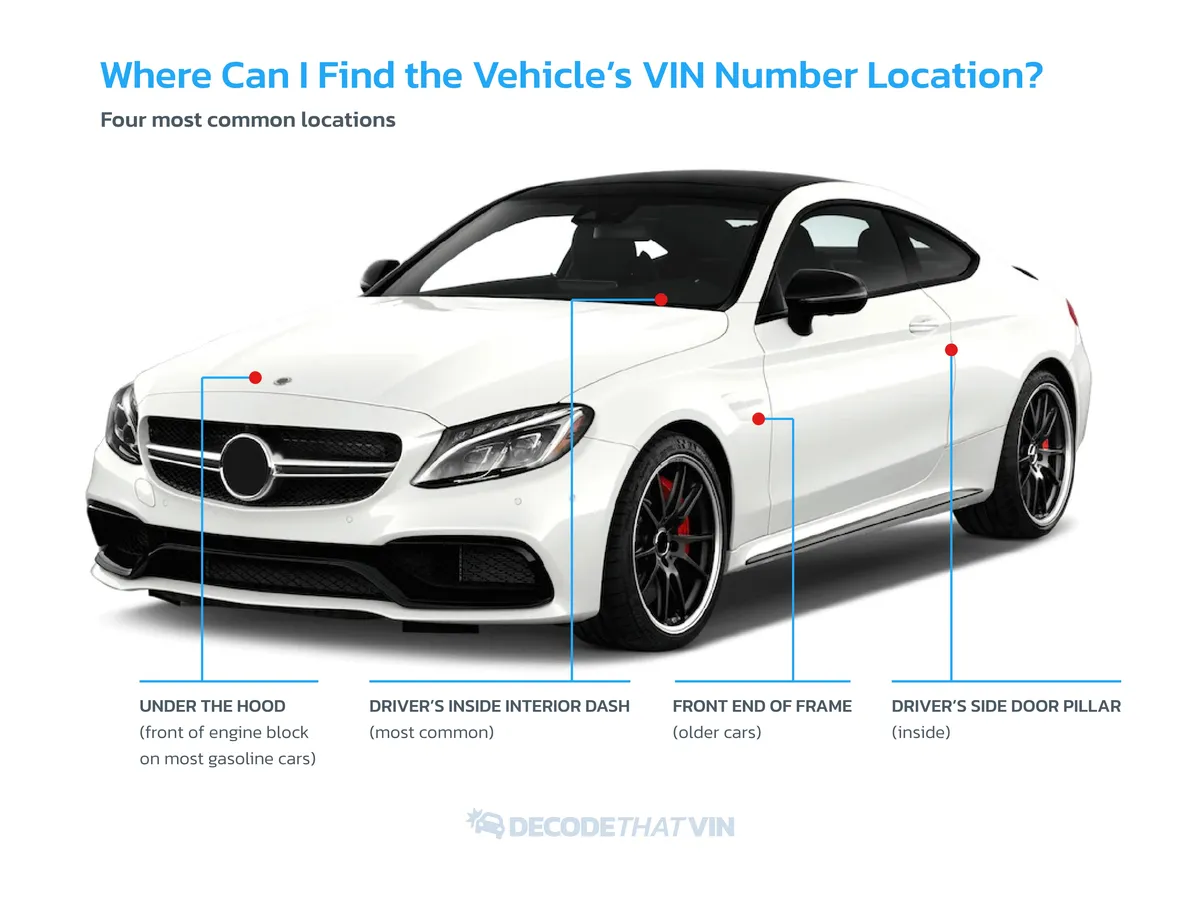
If you need your VIN, here is where to look. On most cars, the VIN is at the front of the dashboard on the driver's side; you read it from outside the car, through the windshield. Many cars also have the VIN on the driver's side door pillar: open the door and look near the latch.
On a motorcycle, look at the steering neck below the handlebars or on the frame near the engine. For any vehicle, if you can't find the VIN on the vehicle itself, it is also printed on the title, the registration and your insurance documents.
How to Decode a VIN Number?
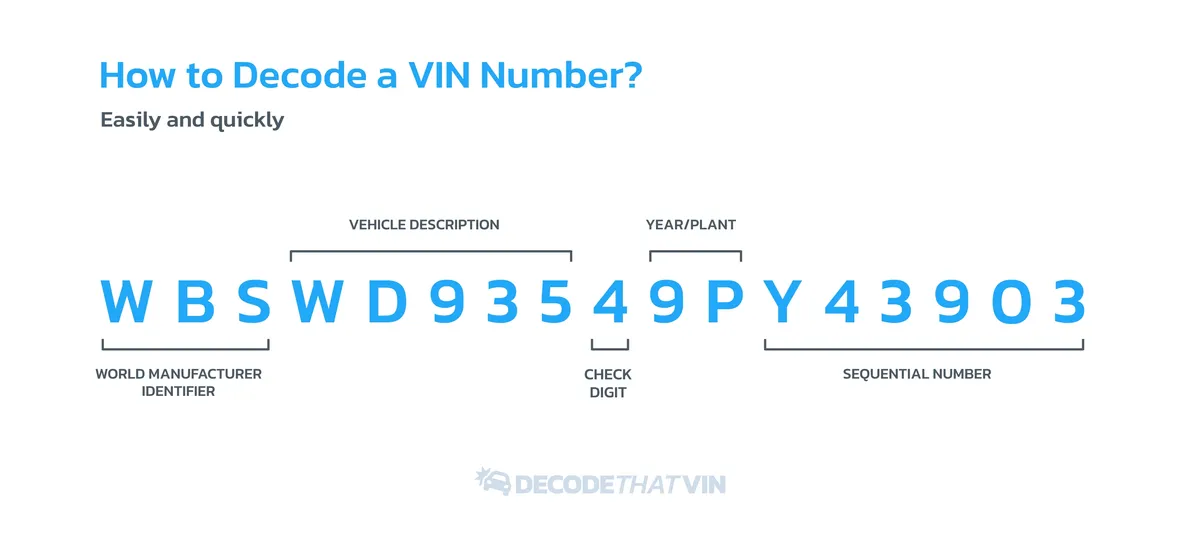
A VIN decoder reads the code for you, but it helps to know how to read a VIN yourself when you don't have a decoder at hand. The first three characters are the WMI, or World Manufacturer Identifier. The first character shows the country or region where the vehicle was built. The second identifies the manufacturer, such as G for General Motors, and the third often the type of vehicle, such as a car or a truck.
Characters 4 through 8 describe the vehicle: the model, body type, engine, transmission and restraint system. The ninth character is a check digit that helps verify that the whole VIN is genuine.
Characters 10 through 17 identify the individual vehicle. The 10th character is the model year (the code starts with 1980), and the 11th is the manufacturer's plant code. The last six, 12 through 17, are the serial number the vehicle receives on the production line.
What Kind of Information Can You Find By Decoding Your VIN Number?
When you decode a VIN, you get detailed information about your vehicle or one you are looking at. The information stored in a VIN includes the make and model of the car, the year it was produced, where it was manufactured, its production number, and features of the car, including engine and transmission type. You can also use the VIN to look up the service history and any reported accidents.
What Is a Car History Check?
Whenever you buy a car, especially a used one, check its history before you make any big decisions. A car history check, or vehicle history report, is a collection of records about the car over its life. It can tell you how many owners the car has had, whether any accidents are on record, whether the inspections are up to date, and more.
It helps you understand any car you are buying, from a dealership or a private seller, and decide whether to buy it and what it is worth. The details include:
- Number of owners, including length of ownership
- Vehicle service history
- Airbag deployment
- Major accidents
- Structural damage
- Past use as a lease, taxi or police vehicle
- Any odometer rollback
- Recall and warranty information
Why Should I Check the VIN Number When Buying a Car?
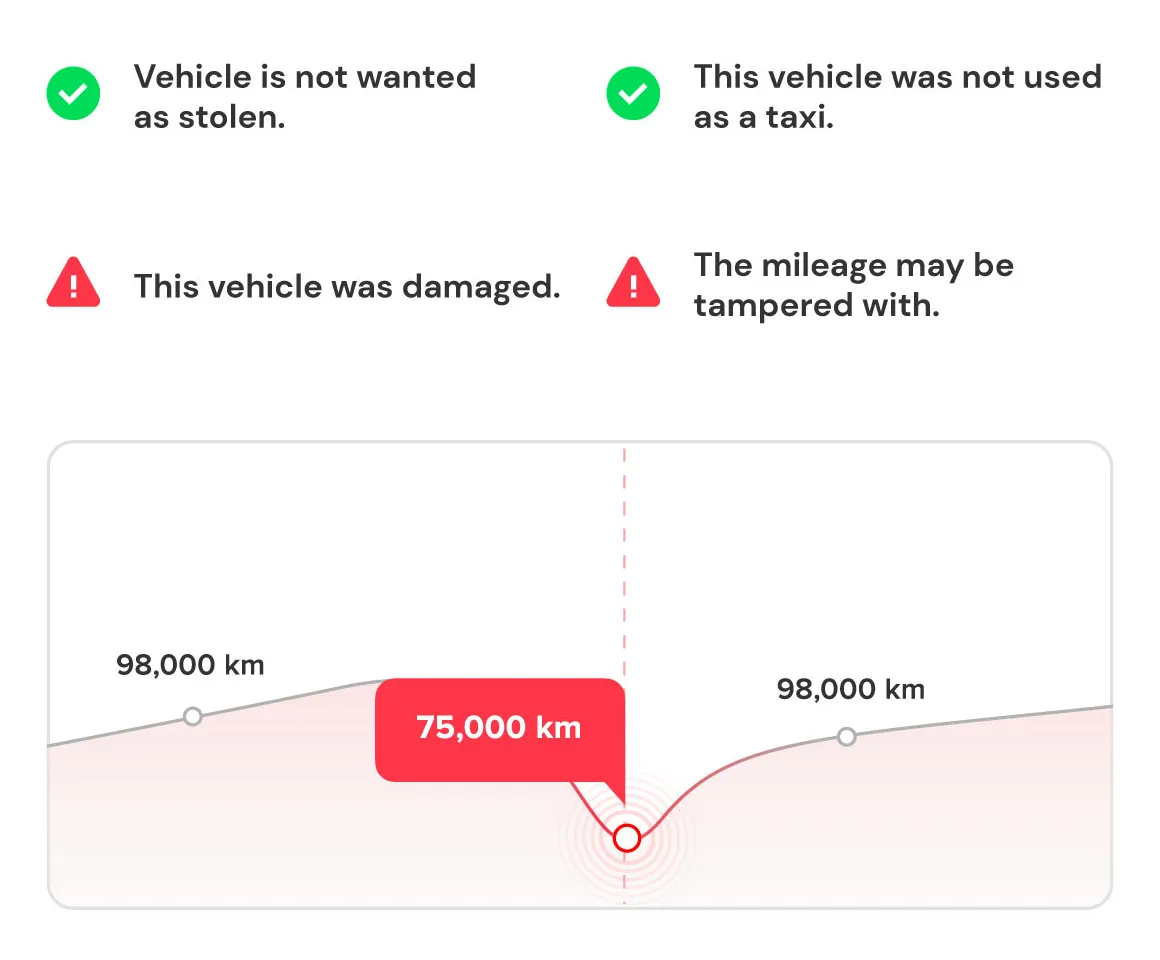
There are hundreds of millions of cars on the road, and the VIN is how each car's history is tracked. Checking the VIN is especially useful when you are about to buy a car: it can reveal things the current owner did not mention. Buyers can use it to find reliable information on the car's past: open manufacturer recalls that were never repaired, the service history and any odometer rollback. It also shows how many owners the car has had, whether it has been in an accident, and more.
This information protects you from getting scammed and from spending more on repairs than you expected. It also helps you judge whether the car is worth the price the seller is asking.
How to Get a Free VIN Check?
Three official US sources can be searched by VIN for free or nearly free: the NHTSA recall lookup (open safety recalls), NICB VINCheck (theft and total-loss records from participating insurers, up to five searches a day) and the NMVTIS title database, whose reports cost a few dollars from approved providers.
None of them shows accidents that were repaired without a total loss, mileage readings between sales or photos from past listings. For those you need a paid history report such as carVertical. Our free VIN check guide compares what each source shows and misses.
Where Does the Free VIN Decoder Get Information?
In the US, every manufacturer must tell NHTSA how its VINs are built (49 CFR Part 565). NHTSA publishes those rules in its free vPIC service, and a good decoder reads them: that is where the make, model, engine and plant of a US-market VIN come from. DecodeThatVIN uses vPIC for every North American VIN.
For European VINs there is no such public source, because European makers do not publish their codes. Our decoder then estimates the model and engine from VINs with the same pattern decoded before, and says so in the result. Whatever decoder you use, check where its data comes from.